RATINGS
75M
DOWNLOADS
4+
AGE

 Download Latest APK
Wait a moment, your result is coming soon!

Face is not found. Please try again with another clear full-face portrait of a better quality.

Take Quiz Now
Screenshots




About this app
-
 Name Live Home 3D: House Design
 -
 category House & Home
 -
 Price 0
 -
 Safety 100% Safe
 -
 Developer Belight Software
 -
 Version 10
 -
 Target Home Designers
 -
 Update 2025.11.06
Related articles




Core Features
-
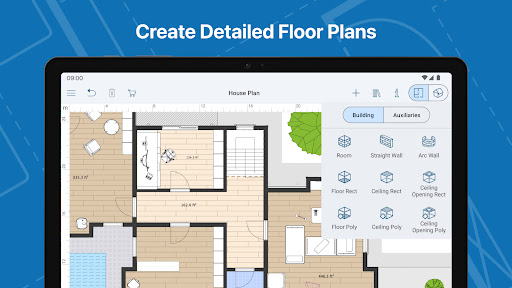
Advanced Floor Plan CreatorLive Home 3D provides a robust floor plan creator that enables users to craft detailed layouts tailored to their specific needs. Whether you’re an experienced architect or a beginner, you can draw inspiration from a library of predesigned houses and modify them to fit your unique style.
-
Extensive 3D Model LibraryWith over 5,000 pre-built 3D models at your disposal, including furniture, appliances, and various décor elements, Live Home 3D simplifies the process of creating stunning home designs. Users can further enrich their projects with free models from Trimble 3D Warehouse, maximizing creative possibilities.
-
Immersive 3D WalkthroughsExperience your designs in full 3D through immersive walkthroughs, allowing you to explore and visualize each room in detail. This feature ensures that your final design aligns perfectly with your initial vision, providing an interactive design validation process.
-
Advanced Lighting and GeolocationOptimize your designs with sophisticated lighting features that adjust according to time of day and weather conditions. This geolocation capability allows for realistic light simulations, enhancing the lifelike quality of your virtual space.
-
Landscape and Garden Design ToolsBeyond interior spaces, Live Home 3D offers tools for landscape planning. Design beautiful gardens and outdoor areas with a diverse selection of trees, plants, and landscaping elements, visualizing your outdoor space in detailed 3D.
Pros
-
User-Friendly InterfaceThe intuitive design interface makes it accessible for both beginners and professionals, allowing seamless navigation and creativity without a steep learning curve.
-
Offline FunctionalityThe app can be used offline, enabling users to work on their home designs anytime and anywhere without needing an internet connection, perfect for on-the-go planners.
-
Comprehensive Sharing OptionsLive Home 3D supports easy sharing of design projects via social media or direct exports for contractors and collaborators, facilitating effective communication and feedback.
-
Customizable TexturesWith over 3,000 textures available, users can personalize their designs by capturing and applying unique textures to their 3D models for a distinct, personalized look.
-
Professional-Level ToolsAdvanced features such as terrain editing and 2D elevation views cater to professional designers seeking to elevate their project planning and execution.
Cons
-
Steep Learning Curve for Complex FeaturesWhile the app is user-friendly, advanced features may require a steep learning curve for new users, particularly those unfamiliar with 3D design tools, potentially hampering initial project speed.
-
Device Performance SensitivityHigh-resolution rendering and complex designs may lead to performance issues on older or low-end devices, affecting usability and design experience.
-
Limited Free FeaturesWhile the free version is comprehensive, certain advanced tools and resources are only available through a subscription, which may limit the free version's overall functionality.
Price
-
Free VersionThe free version offers a wide range of features, including basic design tools and access to a limited model library, making it suitable for casual users and DIY projects.
-
Pro SubscriptionFor a monthly or yearly fee, users can unlock Pro features, including extensive design tools and advanced functionalities, ideal for professional architects and serious designers looking to maximize their design potential.
Ratings
4
1.6K votes
-
5
-
4
-
3
-
2
-
1