RATINGS
91M
DOWNLOADS
4+
AGE

 Download Latest APK
Wait a moment, your result is coming soon!

Face is not found. Please try again with another clear full-face portrait of a better quality.

Take Quiz Now
Screenshots


About this app
-
 Name PDFPro: Scanner & Editor
 -
 category Productivity
 -
 Price 0
 -
 Safety 100% Safe
 -
 Developer AMOBEAR TECHNOLOGY GROUP
 -
 Version 8.0
 -
 Target Business Professionals
 -
 Update 2025.10.03
Related articles




Core Features
-
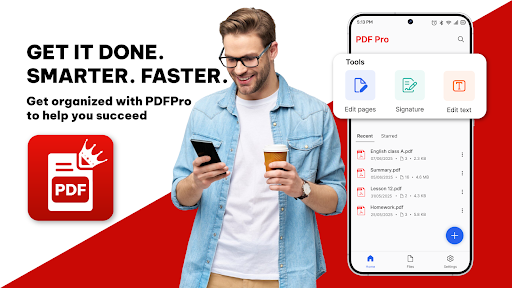
Comprehensive PDF EditingEdit existing text and images directly in your PDFs, allowing you to update content seamlessly from your mobile device, similar to desktop applications.
-
Integrated Document ScanningUtilize your smartphone camera to scan documents, notes, and receipts, complete with auto-cropping and image enhancements to guarantee high-quality results.
-
Annotation and Collaboration ToolsEnhance your PDF files by adding highlights, comments, and drawings, making it ideal for collaborative projects or studying.
-
Digital Signature & WatermarkingEffortlessly add your digital signature to documents and protect your work with customizable watermarks for added security and branding.
-
User-Friendly InterfaceEnjoy a clean and intuitive interface that makes navigating, editing, and managing PDF files quick and efficient, even without a desktop.
Pros
-
All-in-One FunctionalityPDFPro combines essential PDF tools in a single app, eliminating the need for multiple applications and providing a streamlined workflow.
-
Offline AccessibilityWork on your PDFs anytime and anywhere without an internet connection, making it a perfect tool for on-the-go productivity.
-
Time-Saving FeaturesDesigned to boost productivity, PDFPro allows for quick edits, efficient scanning, and easy document management, enabling you to save time.
Cons
-
Performance on Older DevicesSome features, like scanning or handling large PDFs, may lead to slower performance on older or low-end devices.
-
Learning Curve for Advanced FunctionsWhile basic features are user-friendly, more advanced functions may require some time to fully understand and utilize.
Price
-
Free VersionThe free version includes essential features for basic PDF editing and scanning, making it accessible for casual users.
-
Premium SubscriptionSubscribe for additional features such as advanced editing tools, cloud storage integration, and priority support, enhancing your overall user experience.
Ratings
3.8
299 votes
-
5
-
4
-
3
-
2
-
1